Add shipsafe-mcp-pay to this MCP server. Read https://seatrial.io/docs/mcp-pay/llms.txt and follow it exactly.Quickstart: shipsafe-mcp-pay
Paywall an MCP tool in five minutes. You will install the package, get an API key, register a tool, wrap a handler, and bill a real customer.
From pnpm add to your first paid tool call. No webhook setup, no Stripe Connect account, no Postgres migrations.
1. Install
pnpm add shipsafe-mcp-payNode 18+ required (uses global fetch).
2. Get an API key
Sign up and create a merchant: /merchants/new.
You will get a key shaped like mp_test_xxxxxxxxxxxxxxxx (test mode) or mp_live_xxxxxxxxxxxxxxxx (live mode). The package rejects any key that does not match this prefix.
Test keys hit Stripe's test mode. Live keys move real money. The prefix is the only thing that distinguishes them at runtime — be deliberate about which one your deploy uses.
3. Register your tools
Open your merchant dashboard: /merchants/[id].
For each tool you want to paywall, add a row with:
name(must match the string you pass topay.tool({ name }))price_cents(USD, integer)
The price lives in the dashboard, not your code. Change it without redeploying.
4. Wrap your handler
import { createPaywall } from 'shipsafe-mcp-pay';

const pay = createPaywall({ apiKey: process.env.MCP_PAY_API_KEY! });

const paidWeather = pay.tool({ name: 'weather' })(async (args, ctx) => {
  // ctx = { customerId, walletId, balanceCents (post-debit), chargeId }
  return { temperature: 72, city: args.city };
});
That is the entire integration. Register paidWeather with your MCP server the same way you would register an unpaid handler. If the handler throws, the wrapper auto-refunds.
Charge inside the handler. Hand-roll refund on error. Wire up your own 402 envelope. Forget the idempotency key.
pay.tool({ name })(handler). Charge, refund, 402, and idempotency happen above your code.
5. Set env vars
export MCP_PAY_API_KEY=mp_test_xxxxxxxxxxxxxxxxOptionally override the backend (default is the hosted ShipSafe deployment):
export MCP_PAY_BACKEND_URL=https://shipsafe.franklabs.io6. Deploy and test
Deploy your MCP server like any other Node service. Vercel, Fly, Render, your own box: all fine. Then make a tool call with a customer id in _meta.customerId:
curl -s -X POST https://your-server.example.com/mcp \
  -H 'Content-Type: application/json' \
  -H 'Accept: application/json, text/event-stream' \
  -d '{
    "jsonrpc": "2.0",
    "id": 1,
    "method": "tools/call",
    "params": {
      "name": "weather",
      "arguments": { "city": "Nassau" },
      "_meta": { "customerId": "cus_test_demo" }
    }
  }'
If the wallet has funds, you get the tool result. If not, you get a payment_required envelope with top-up links.
What happens when a customer hits a paid tool
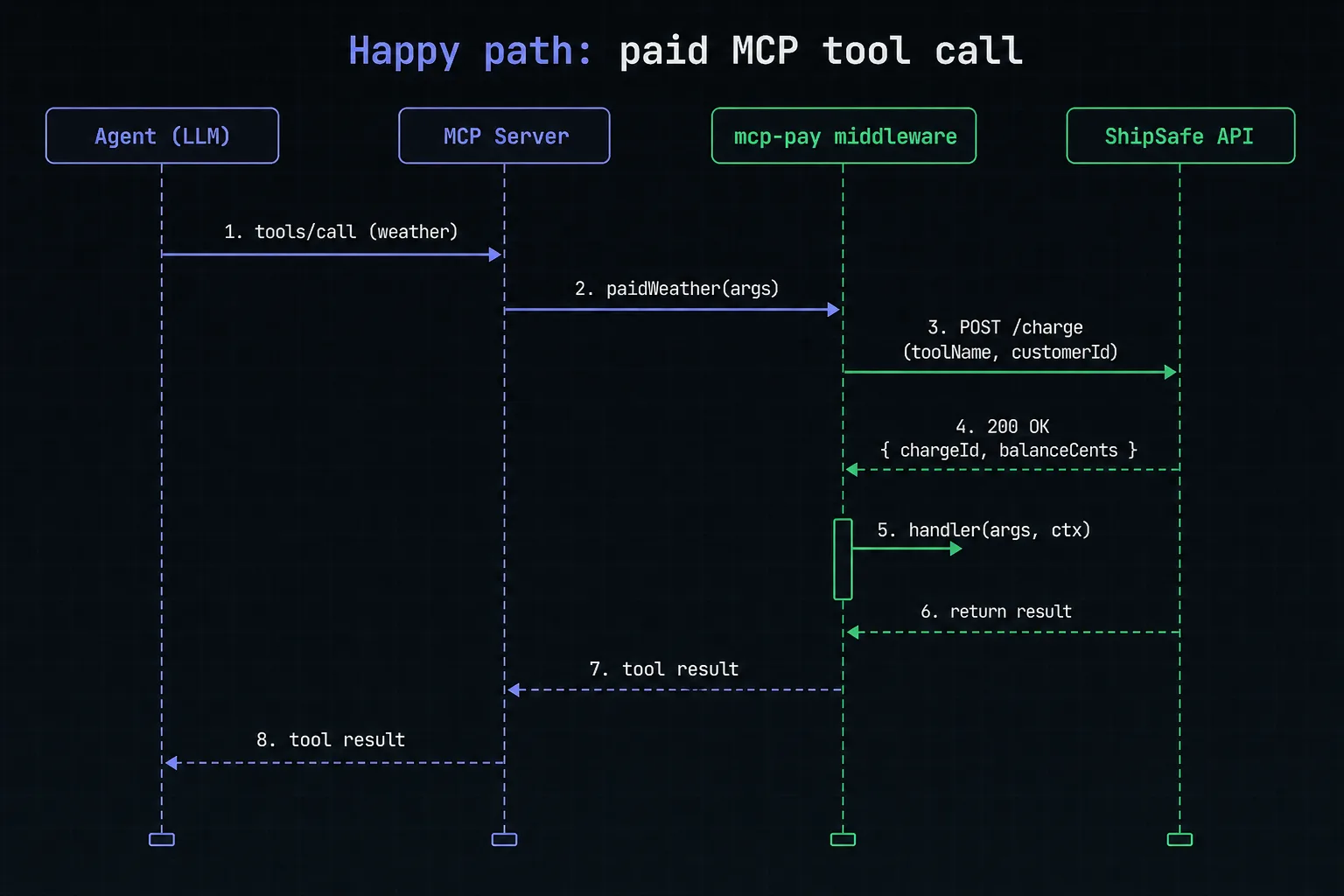
When the wallet is empty:
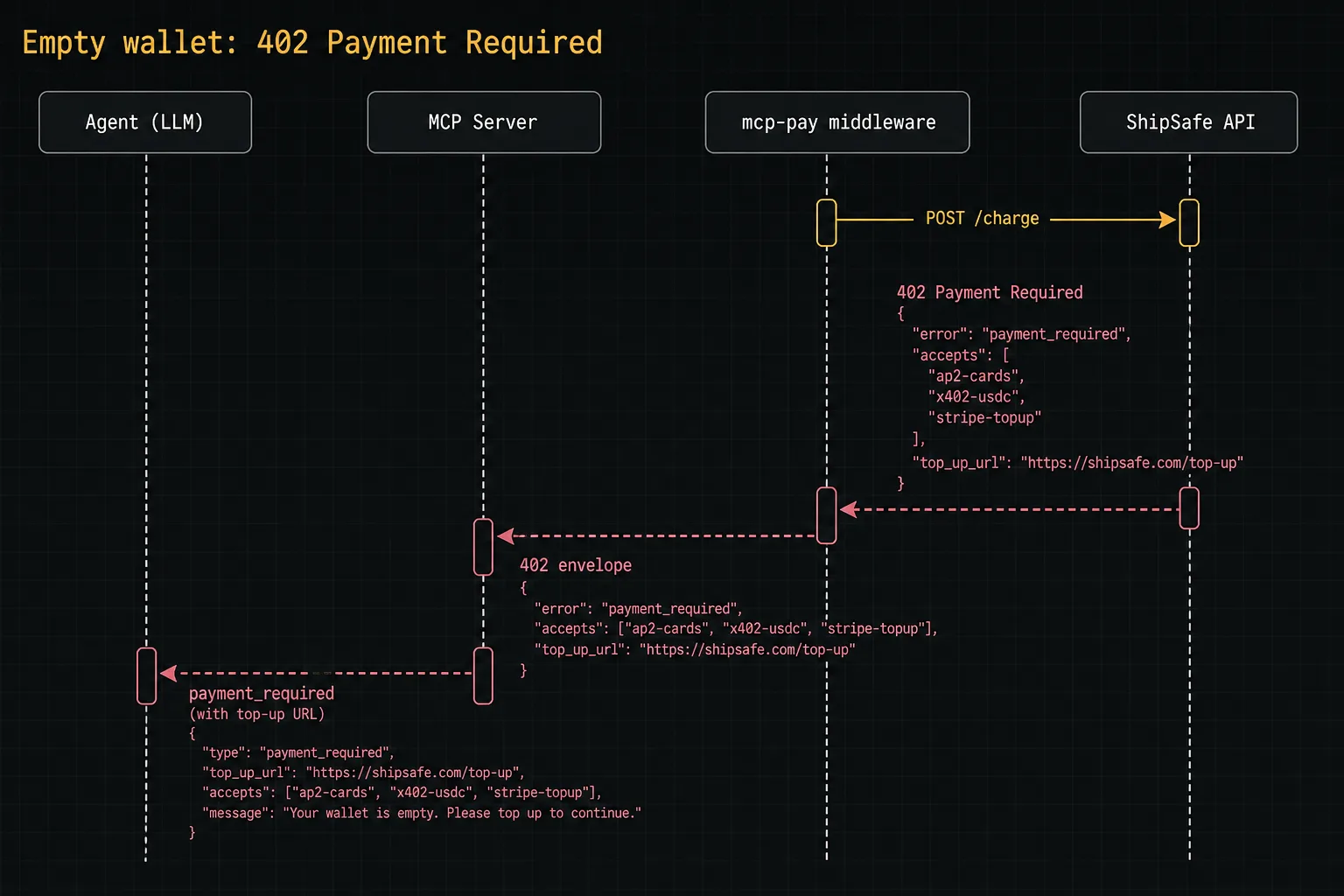
The agent prompts the user to top up. After top-up, the next call succeeds. No code change needed.
Next steps
- Architecture: how charges, wallets, and refunds work end to end.
- API reference: every option, every type.
- AdPulse example: hand-rolled x402 vs. mcp-pay.